Cấu hình Dual ISP S2S Tunnel Failover trên Palo Alto
Tự động chuyển đổi giữa hai nhà cung cấp dịch vụ Internet (ISP) là một yếu tố quan trọng trong việc đảm bảo tính sẵn sàng và liên tục của kết nối mạng. Trên thiết bị bảo mật Palo Alto Networks, bạn có thể cấu hình Dual ISP Site-to-Site (S2S) Tunnel Failover để đảm bảo rằng kết nối VPN giữa các vị trí của bạn không bị gián đoạn khi một trong hai ISP gặp sự cố. Dưới đây là một bài viết hướng dẫn về cách cấu hình Dual ISP S2S Tunnel Failover trên Palo Alto.
Bài viết sưu tầm của bạn Đỗ Hòa Thành https://www.facebook.com/dohoathanh.
Link bài viết https://www.facebook.com/groups/labccnaccnpfirewall/posts/849271743435806.
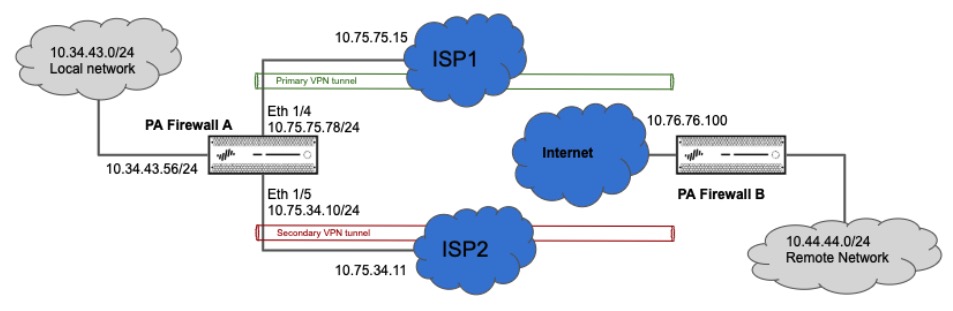
Tunnel.1 is configured for Primary VPN tunnel.
Tunnel.2 is configured for Secondary VPN tunnel.
Cả 2 tunnel VPN nằm ở zone Security Zone “L3-VPN”
Vào Network > Interface > Tunnel.

Network > IPSec Tunnels.

Vì cả 2 tunnel đều nằm trong 1 zone nên ta chỉ cần cấu hình 1 policies.

Cấu hình 2 ip tunnel tương ứng cho 2 ip wan.
- Primary Tunnel Interface.
Tunnel.1 --> 10.10.10.1/30 Peer Tunnel.1 --> 10.10.10.2/30
- Secondary Tunnel Interface.
Tunnel.2 --> 10.10.20.1/30 Peer Tunnel.2 --> 10.10.20.2/30
Có 2 phương pháp cấu hình VPN tunnel traffic automatic failover và có thể sử dụng 1 trong 2 phương pháp dưới đây.
- Failover using Tunnel Monitoring.
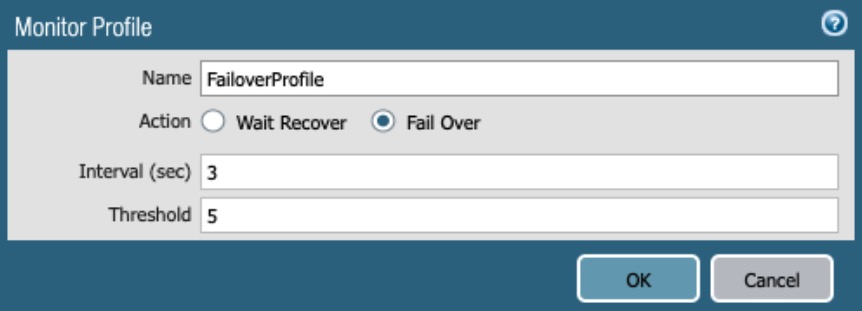
Cấu hình profile Failover để giám sát khi có 1 tunnel vpn bị down thì nó sx chuyển qua tunnel còn lại
Configure a Monitoring Profile.
Network > Network Profiles > Monitor > Add
Make sure “Fail Over” Option is selected.
Enable Tunnel Monitor on the IPSec Tunnels
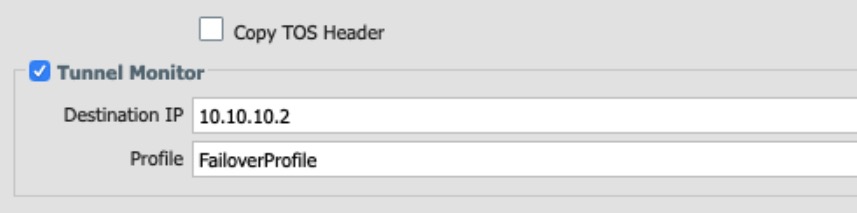
Network > IPSec Tunnels > Primary-Tunnel/Secondary-Tunnel > Enable Tunnel Monitor
Cấu hình destination IP là ip tunnel.1 và giám sát qua Monitor Profile “FailoverProfile”.
Trong ví dụ ta sẽ giả sử tunnel.1 của vpn bị down .
Network > IPSec Tunnels.

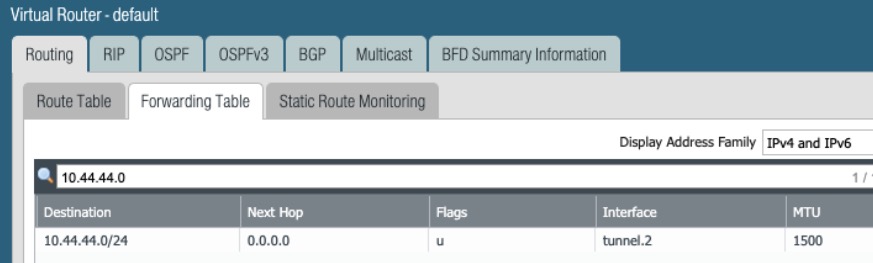
Route tunnel.1 sẽ bị xóa và tunnel.2 sẽ được bật lên trong Forwarding Table.
Network > Virtual routers > Click on “More Runtime Stats” for default > Forwarding Table.
Khi traffic vpn được khôi phục ta và tunnel monitor sẽ báo down và up và sẽ được ghi log ở system logs
Monitor > Logs > System.

- Failover using Static Route Path monitoring.
Ở Path Monitoring sẽ giám sát failover qua metric
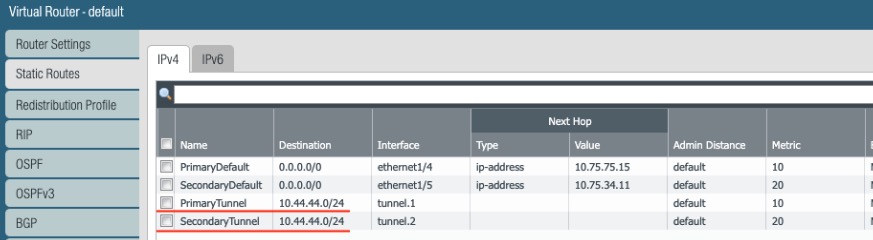
Cũng tạo 2 route và remote network 10.44.44.0/2.
Primary route với metric 10 và cấu hình là tunnel.1 interface.
Secondary route với metric 20 và cấu hình là tunnel.2 interface.
Network > Virtual Routers > Default > Static Routes.
Primary VPN cấu hình remote tới ip tunnel 10.10.10.2 từ source ip tunnel.1 là 10.10.10.1.
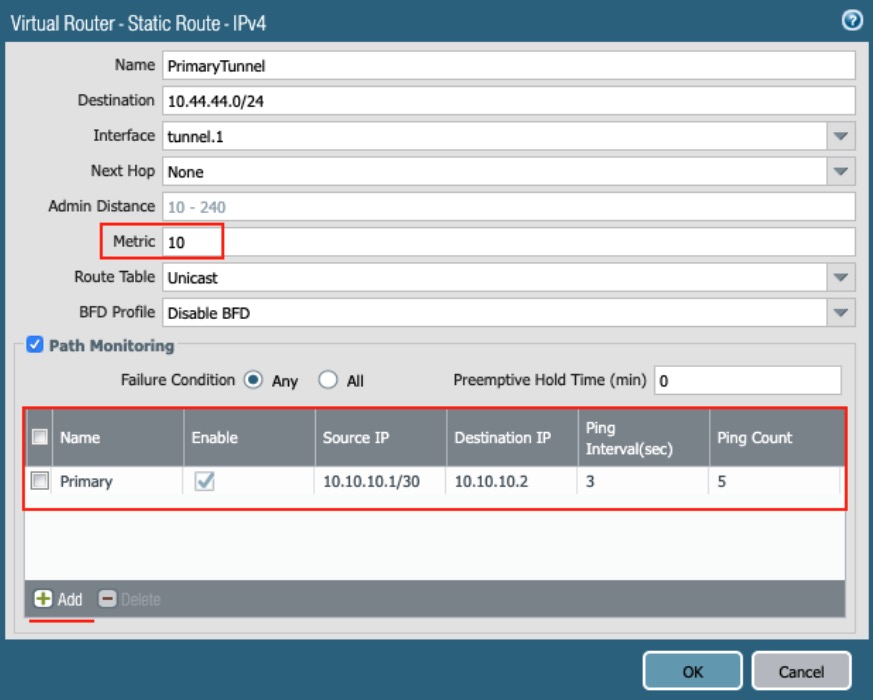
Chú ý : The “Preemptive Hold Time” set 0 để khi tunnel.1 hoạt động lại nó sẽ phục hồi được ngay
Trong ví dụ giả sử tunnel.1 down
Network > Virtual routers > Click on “More Runtime Stats” for default > Static Route Monitoring.
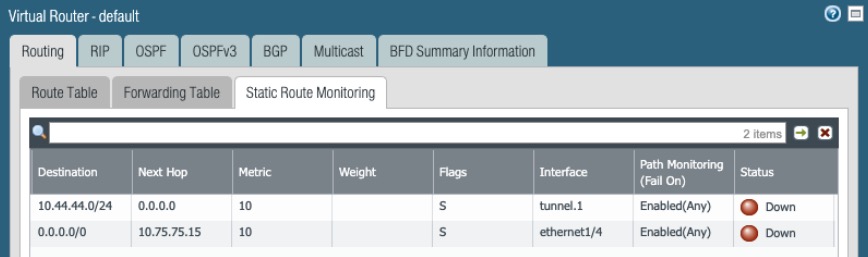
Ngay khi tunnel.1 down ta sẽ thấy route tunnel.1 sẽ bị xóa khỏi bảng forwarding table. Để xem được này ta vào các bước sau:
Network > Virtual routers > Click on “More Runtime Stats” for default > Forwarding Table
This can also be checked under
Network > IPSec Tunnels > “Show Routes”.
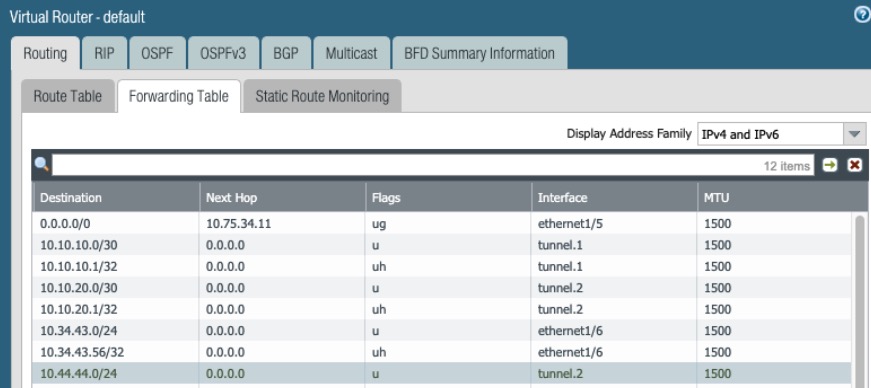
> show routing fib

--------------------------------------------------------------------------------
virtual-router name: default

id      destination           nexthop            flags  interface          mtu
--------------------------------------------------------------------------------
131     0.0.0.0/0             10.75.34.11        ug     ethernet1/5        1500
132     10.44.44.0/24         0.0.0.0            u      tunnel.2           1500
Lỗi và quá trình khôi phục các tunnel sẽ được ghi nhận như bên dưới:
Monitor > Logs > System.