[Kubernetes 15] Metric trong Kubernetes
Metrics server trong kubernetes (metrics server) giám sát về tài nguyên sử dụng trên cluster, cung cấp các API để các thành phần khác truy vấn đến biết được và mức độ sử dụng tài nguyên (CPU, Memory) của Pod, Node … Cần có Metric Server để HPA hoạt động chính xác.
Vào github của metrics server chọn phiên bản cần triển khai rồi download nó về, lưu ý là phiên bản của metrics server phải phù hợp với phiên bản Kubernetes nhé.
Mình đang sử dụng Kubernetes phiên bản 1.23.x nên mình chọn metrics server phiên bản 3.8.2.
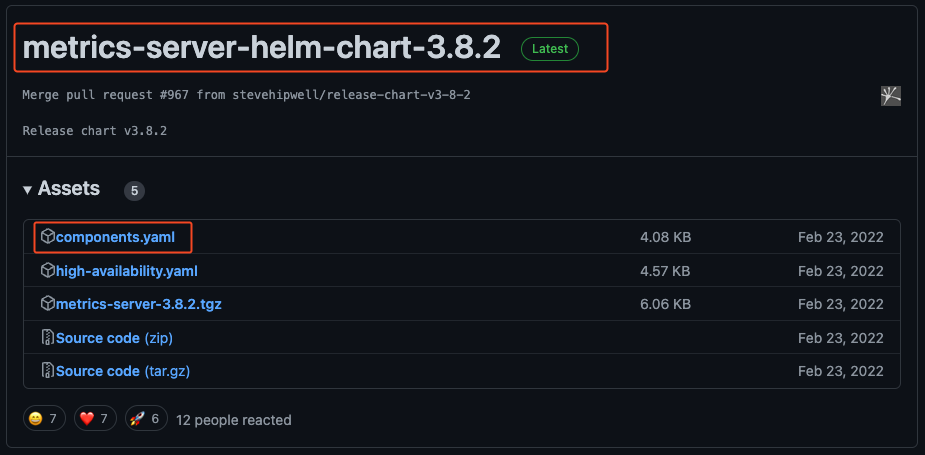
Giờ ta download file components.yaml về.
$ wget -O components.yaml https://github.com/kubernetes-sigs/metrics-server/releases/download/v0.4.0/components.yaml
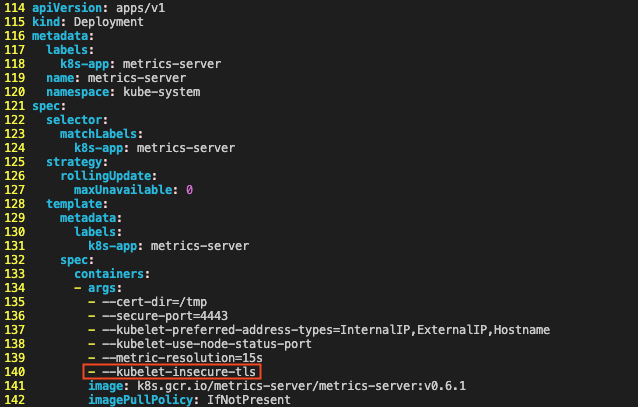
Khi triển khai metrics-server thì hệ thống mặc định sẽ yêu cầu Kubelet certificate nhưng nếu chúng ta chưa có certificate thì có thể tạm thời bỏ qua nó bằng cách mở file components.yaml, tìm đến spec.template.spec[0].args và thêm trường –kubelet-insecure-tls như hình dưới
Triển khai file components.yaml
$ kubectl apply -f ./components.yaml
serviceaccount/metrics-server created
clusterrole.rbac.authorization.k8s.io/system:aggregated-metrics-reader created
clusterrole.rbac.authorization.k8s.io/system:metrics-server created
rolebinding.rbac.authorization.k8s.io/metrics-server-auth-reader created
clusterrolebinding.rbac.authorization.k8s.io/metrics-server:system:auth-delegator created
clusterrolebinding.rbac.authorization.k8s.io/system:metrics-server created
service/metrics-server created
deployment.apps/metrics-server created
apiservice.apiregistration.k8s.io/v1beta1.metrics.k8s.io created
Khi triển khai xong, ta chờ 1 lát để quá trình triển khai diễn ra, sau đó dùng lệnh dưới để xác nhận lại.
root@k8s-standalone:/home# kubectl get po -n kube-system -l 'k8s-app=metrics-server'
NAME                              READY   STATUS    RESTARTS   AGE
metrics-server-7cf8b65d65-h7ngp   1/1     Running   0          58s
Sau khi metrics server triển khai thành công chúng ta thử kiểm tra xem nó hoạt động ổn không bằng 1 lệnh kiểm tra performance của node như dưới.
root@k8s-standalone:/home# kubectl top node -n kube-system
NAME             CPU(cores)   CPU%   MEMORY(bytes)   MEMORY%
k8s-standalone   195m         4%     1544Mi          19%
Hoặc performance của các pod
root@k8s-standalone:/home# kubectl top pod -n kube-system
NAME                                       CPU(cores)   MEMORY(bytes)
calico-kube-controllers-7f76d48f74-cssxd   3m           16Mi
calico-node-jlr78                          34m          87Mi
coredns-64897985d-7gmwr                    2m           12Mi
coredns-64897985d-l2bqh                    2m           12Mi
etcd-k8s-standalone                        13m          37Mi
kube-apiserver-k8s-standalone              55m          316Mi
kube-controller-manager-k8s-standalone     12m          47Mi
kube-proxy-zwf7s                           1m           12Mi
kube-scheduler-k8s-standalone              3m           17Mi
metrics-server-7cf8b65d65-h7ngp            4m           15Mi